Translate

Showing posts with label windows app. Show all posts

Tuesday, 29 July 2014

Fitbit app for Windows Phone


Fitbit is a wireless activity tracker allows you to track health and fitness metrics like distance travelled, steps taken, calories burned, active minutes, floors climbed and sleep quality. In Windows Phone 8.1 update Bluetooth is much improved and Fitbit is the first app taking its advantage. The app is very identical to its iOS and Android versions. You can now sync trackers like the Flex, One and Zip to your smartphone with a live tile to your Home screen.

Fitbit will work only in devices having Windows Phone 8.1 with Lumia Cyan update. It also require Bluetooth 4.0. You can download it from the Windows Phone store.

Features:

  • Sync by automatic or wireless via Bluetooth 4.0
  • Pin to start screen
  • Nutritional foods of more than 350, 000
  • Social community of its own

Starting Fitbit:


  • Open the Fitbit app
  • Tap Join Fitbit
  • Choose your product
  • Tap the set up option
  • On the next few screens, enter your personal details. This information is used to calculate your basal metabolic rate (BMR), which determines your calorie count for activities.
  • Enter your name, email address, and desired password and tap the 
  • check mark at the bottom of the screen.
  • Follow the onscreen instructions to set up your tracker to your account.


Connect me on FacebookTwitter

Tuesday, 15 July 2014

Microsoft's official weather app for Android and Windows Phone


Windows phone store always lags official apps. But now the situation is slightly changing. Because in last week Microsoft has given new updates to Skype. They had also launched a new video editing app named Video Tuner. Now come up with a new app called Climatography for both Windows phone and Android phone users.

The app gives about climate information of various places along with weather conditions of different years. Most of the weather app will forecast about climate changes for upcoming days only.

Requirements:

  • For Android - 2.3.3 OS version Gingerbread or above
  • For Windows – Windows Phone 8 / Windows Phone 8.1

Download links:


Now Climatography app doesn’t have Fahrenheit scale. Hope it could be corrected in next updating versions with many new features.

For more updates like my Facebook page or follow me in Twitter
Picture credits : www.wallpaperpics.net


Thursday, 10 July 2014

New Video editor for Windows Phone


For editing the videos taken in your Windows phone, Microsoft has launched a new app called Video Tuner. This free app is for Windows phone 8.1 devices. Video Tuner will be available exclusively only for selected Lumia handsets (Nokia Lumia 630 with 4G sibling, Nokia Lumia 635 and upcoming Nokia Lumia 930).

The app has some more extra features when compared with Microsoft’s Movie Moments app. Because Movie moment app has restricted users to edit videos down to 1 minute or less. While Video tuner has the ability to shorten the length, trim, crop, rotate or flip the captured video clip. It can be also used to apply different filters and various audio tracks (add music). The app has all the basic features including exposure, saturation and contrast fixing. Any way I suggest Video Tuner than Movie Moments app for editing videos in your Windows 8.1 phone.

It allows users to export the edited videos to social networks from inside the app. Videos can be uploaded to One Drive also so that users can now take the advantage of newly updated free 15 GB data storage. Video Tuner can be now downloaded from Windows phone store.

For more:

 Hit LIKE to connect me on Facebook.
Subscribe to get daily updates.

Wednesday, 9 July 2014

New Skype enables Cortana Integration


The new Skype update (version 2.19) from Microsoft for Windows phone enables Cortana integration. So the users having the latest version of Windows phone can give commands for voice or video calls like “Skype call ABC” without opening the app and Skype will do it. By using this video call can be also done very easily. Microsoft paves new way of Cortana integration to third parties. Cortana integration will be available only to the Windows phone 8.1.

Main Features:
  • Better Voice/Video call using commands
  • Edit message after sending
  • Push notification
  • Supports 51 languages

Another main feature is that the user could edit a message after it is been sent. It has also given updates to the push notifications and fast app resume. The new Skype supports 51 languages from that of 19 in last version. Cortana is currently for US soon it will be available in other countries.

For more:

Connect me on FacebookTwitter
Subscribe to get daily updates.

Twitter app for Windows phone get new update


The Twitter has finally got its update. This is the first update for the app since November 2013. You may think it would be a nightmare because it has taken a long break of about seven months, but it is true. The supports both Windows 8.1 phone and Windows 8 phone. It will surely give new hope to Windows phone lovers that in future Twitter will come up with new features.

The official update of version 3.2 allows users to upload multiple photos in a single tweet itself. It has also a feature to tag friends in uploaded photos. Enables to share photos through direct messages itself. The home timeline will now show a preview of tweets containing pictures.

New features added is the ability to reply, favorite and retweet from your timeline itself. It has also some performance improvements. The app is same as that in other devices like Android, iOS.

Key features:
  • Supports both Windows 8.1/8 phone
  • Upload multiple photos in a single tweet
  • Tag friends in photos
  • Share photos through direct messages
  • Reply, re-tweet, etc. from timeline

Limitations:

  • Do not support .GIF format
  • Cortana integration is not mentioned
Let's hope this limitations will be solved in next update to make the app same as that of other devices.

You can download this free app from [Windows phone store].

For more:


Hit LIKE to connect with Facebook.
Subscribe to get daily updates.

Tuesday, 8 July 2014

Facebook app update for windows phone

    Microsoft has now delivered new updates to its Facebook Beta app version 5.2. This will be available to both Windows 8 phone and Windows 8.1 phone users. The update includes bug fixing and performance improvements. The new app from the current social media giant will be more integrated with Windows 8.1 phones.


Now the app will be working in a good manner than before. Main attraction of Facebook Beta is that we can see photos along with comments. News feed, Message, Notification, etc. will be carried out in a much fast manner.


You could now upload videos directly along with your status. But in earlier app only photos can be uploaded. This helps to improve your status in a better way so that it could be noticed by all your friends. The update also includes a new look. It can be set as your lock screen tile.

Key features:

  • Well designed
  • Video upload along with status
  • Works faster
  • Performance improvements
  • Messaging improvements


Wednesday, 2 July 2014

Read eBook using Scribd


Scribd which is one among world’s largest digital library of over 80 million users. Now they have a new app to read eBooks on your Android and iOS. Now it is available for Windows phone 8, Windows phone 8.1. The users could access it by paying an amount of $8.99 per month with free subscription of one month. The subscription includes an instant access to 300,000+ books from 900+ publishers in all genres.

I don’t think it is a huge amount because those who read a lot has an opportunity to read unlimited number of books around the world without buying it. A web browser is also included in this app helps users to search things. Another main attraction of Scribd is that it has very good design of a book shelf. Users should need a better Wi-Fi connection otherwise it can’t be used smoothly.

  • Works in iPhone, iPad, Android, Windows devices
  • Millions of users around the globe
  • Pin favorite books to start screen
  • Need WiFi connection


“Music lovers has Netflix, music lovers have Spotify and now book lovers (whether they read fiction or best-selling potboilers) now have Scribd”

 -NPR

Tuesday, 1 July 2014

Photoshop app for Windows Phone


Finally Adobe has launched Photoshop Express for Windows phone, by this Windows OS will be having one of the most popular image-editing app. It will be available free for all Windows phone 8 and Windows phone 8.1 devices with at least 512 MB of RAM on board. The app has been launched after five years of its iOS version and three years of Android app to get existed. The new app will have the same basic features of editing as seen in iOS and Android.

Adobe Photoshop Express offers a lot of options to beautify your images. Sometimes it could be used to edit a disappointed shot to an awesome look as you wish, which can be admired by many. As it is a free app some functions are locked up.

No photo editing app will be having twenty two look filters which could be used to transform your images from a lot of noises. If you wish to have twenty more which can be purchased by paying $2.99 in order to access Premium looks. By using the top right button you can easily share your edited photos to Facebook, Twitter, etc. very easily.

Easy touch ups:
  • Fix photos fast-crop, Rotate, Straighten, Flip, adjust color, remove Red eye
  • Adjust White balance. Hue, Brightness
  • Finishing touch with Borders and Frames

Auto fix:
  • One touch adjustment for Shadows, Exposure, etc

Quick sharing:
  • Post photo to social sites easily
  • Email and SMS text photos to your loved and family


Monday, 30 June 2014

Earn through Bing Rewards


At last Microsoft has expanded its Bing Rewards app for Windows phone users same as that on Android and iOS. This could be used for both Windows phone 8/8.1 OS.

With Windows phone 8.1, Bing Rewards can be integrated with the built-in search app. This app will earn Bing Rewards for all the searches which you do in your Windows phone using Bing search engine.

In order to get the advantage of Bing Rewards you have to first sign up at the Bings Rewards website using your Microsoft account. Then to earn the Bing Rewards start searching with Bing. There are also other methods to increase your credits by exploring Bing tips and tricks, trying new Bing features, etc.

You can also pin the Bing Rewards app to your start screen to track your available credits and could easily complete daily offers. After you have earned enough credits then, you can redeem them for rewards to purchase apps and games from the Windows and Windows phone stores. It can be also used to purchase online products from Amazon.com and much more.


  • Earn credits: Find out new methods to earn more credits.
  • Account: To manage your Bing Reward account app.
  • Track credits and offers from live tile: Keeps the Bing Rewards app to your start screen to view available credits and complete daily offers.


Bing Rewards is currently available for United States only. Others have to keep on waiting because Microsoft always comes with a surprise for the users who sticks to it.

For more:
Hit LIKE to connect with Facebook.
Subscribe to get daily update.

Monday, 23 June 2014

Free YouTube in Windows phone


YouTube is one of those indispensable services on mobile these days, especially if you want to watch anything. When internet connection becomes an essential for every mobile phones nobody likes to watch streaming videos. But there isn't an official app yet for watching YouTube videos in Windows phone. Earlier there was an official YouTube app but it creates a lot of problems. An upgradation was given to this app by including many features to it, later it was removed for the time being it didn't come back. We can hope that one day this could be changed because Windows has already given a free update from Windows 8 to 8.1. Now there are different apps which helps us to view YouTube videos.

  • TubePro

It is a freeware app (Pro is only its name) helps to watch YouTube videos. It can be also saved for viewing it later without connecting it to the internet. Those downloads can be resumed and stopped. The videos can be downloaded according to the option such as LQ (Low quality), HQ (High quality) or HD (High definition which is 720p). We can view and post comments by using Tube Pro.
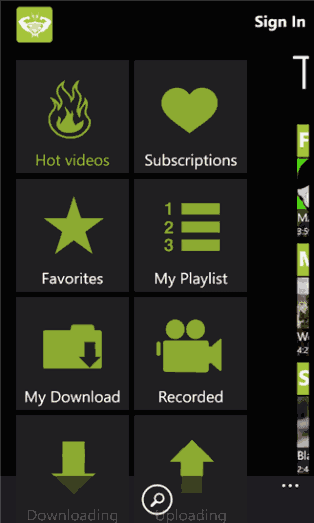

Tube Pro


  • MyTube


MyTube is also a good app for watching YouTube videos. It has a transparent tile option which can be selected from the ‘pin static tile’ in the settings and then select transparent. It will be for Windows phone 8.1. The comments has been changed slightly in order to load faster and more reliable. It works in background even if the video is playing.
MyTube
If you would like to buy the apps by spending some money then select MetroTube or Toib while both of them will be having a trial period.

  • MetroTube


A clear cut app which enables you to easily watch videos on YouTube, manage your account and add comments from your Windows phone. Videos can be viewed using different presets, while you can control the volume with the help of a slider bar, add them to favorites as well as to watch later list. Description can be also viewed by a single click.
MetroTube

  • Toib


Video playback is great with Toib. Once you start playing a video in Toib you can rotate your phone to make it full screen. Then you can toggle between HD or change your location in video playbacks.
Toib
As the above mentioned apps are third-party apps, they are not sanctioned by Google or YouTube, visiting YouTube’s mobile website is the safest long-term solution to watching YouTube videos on Windows Phone. Any of the apps mentioned here could stop working, whether users paid the developer money or not. If that makes you nervous, stick to the free YouTube app alternatives.

Enjoy watching YouTube videos